Flexible grid layouts
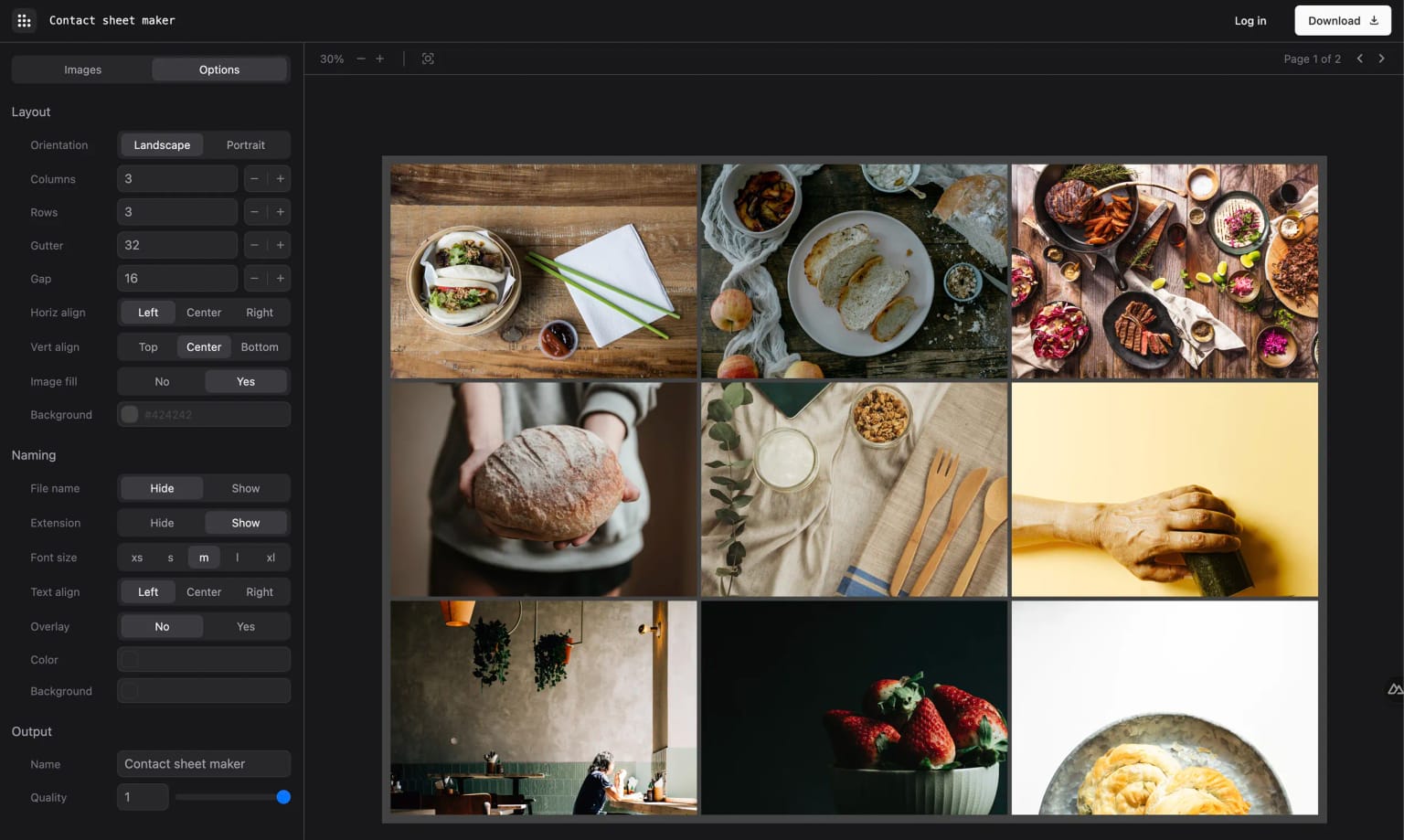
Choose the number of columns, tune spacing, reorder images, and keep filenames visible while you work.
Contact sheets, without the layout work
Turn photo sets into clear client decisions. Upload images, arrange a polished grid, add the details you need, and download one organised PDF instead of sending a folder of loose files.
Try the editor free. PDF download requires a paid plan.
Upload
Add the full image set
Arrange
Set grid, labels, and branding
Deliver
Download or share for review
Scan the essentials, then explore the full set when you need more detail.
Choose the number of columns, tune spacing, reorder images, and keep filenames visible while you work.
Add a logo or text watermark, control its placement, and save a consistent presentation for repeat jobs.
Export a clean, high-quality document for review, printing, production notes, or client delivery.
Keep active sheets organised in your dashboard and return to the same image order and settings later.
On Ultimate, send one review link where clients can select images, add notes, and submit a clear response.
Build freeform visual directions with images, video, PDF pages, and type alongside your contact-sheet workflow.
Contact sheets explained
A contact sheet places labelled photo thumbnails into an ordered grid. It gives photographers, clients, and production teams a quick way to compare frames and record the images they want to use.
Add images in the browser and choose the grid and page details. The editor works without an account. Downloading a PDF, saving projects, adding brand tools, and sharing proofing links require a paid plan.
Replace email threads and marked-up screenshots with a contact sheet clients can review themselves. Their picks, image notes, and final comment arrive together, tied to the project.
Available on Ultimate
$19/month or $190/year. Includes share links, client proofing, notifications, and 100GB storage.
Open a saved sheet, set an optional pick limit, and copy the private link.
They choose images and leave filename-specific notes in the browser. No client account is needed.
Get the submission email, review every note, and copy selected filenames from your dashboard.
Gather references, layouts, video, and documents on one freeform canvas. Present a coherent direction, share it with the client, and resolve feedback where the work lives.
Builder included with Pro. Password-protected sharing and canvas comments are included with Ultimate.
01
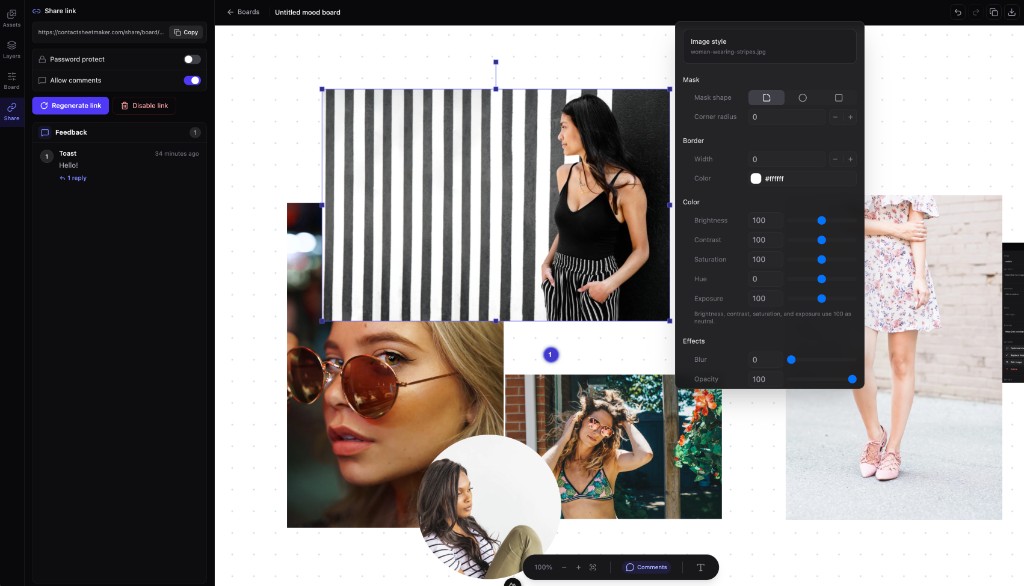
Place images, text, video embeds, and PDF pages anywhere on the canvas.
02
Use image masks, borders, filters, and colour controls to make the board feel considered.
03
Send a password-protected link and keep client comments attached to the board.
Start in the dedicated mood board workspace, or open your saved boards from the dashboard when you are ready to continue.
Simple pricing
Try the editor free, then upgrade to download, save, and share.
Annual billing includes two months free.
Start here
No credit card required
Try the editor for free. Download with a paid plan.
For growing workflows
Cancel anytime
Create contact sheets, mood boards, and branded outputs.
Most popular
Cancel anytime
Share mood boards and contact sheets with clients, collect feedback, and get notified instantly.
From the blog
Practical advice on contact sheets, watermarking, client proofing, and the tools that keep creative work moving.
24 Sept 2026
Nine proven contact sheet layouts for film, portraits, weddings, products, and listings, with the orientation, columns, and rows to copy for each.
Read article23 Sept 2026
Step-by-step Contact Sheet II settings for Photoshop, how to turn the pages into one PDF, common fixes, and when a browser tool is quicker.
Read article22 Sept 2026
Choose the paper, grid, and printer settings that keep thumbnails and filenames readable, including A4 and US Letter thumbnail sizes.
Read articleClear answers about creating, downloading, and sharing your work.
A contact sheet arranges a set of photographs as labelled thumbnails on one or more pages. Photographers and creative teams use it to review a shoot, compare frames, record selections, and share an ordered overview without sending every full-size image separately.
Yes. You can create and preview a contact sheet in the editor without registering. Downloading a PDF requires a Pro or Ultimate plan. An account is also needed to save work or use other paid features.
The free plan includes the core layout editor so you can upload photos, arrange a grid, and preview your sheet. PDF downloads require Pro or Ultimate. Paid plans also add mood boards, watermarking, brand presets, and saved workflows.
ContactSheetMaker supports common photography formats including JPEG, PNG, GIF, BMP, and TIFF. You can add a full set of images in one upload.
Yes. Pro and Ultimate plans let you add custom watermarks and control their content, position, size, and opacity.
Ultimate users can share a saved contact sheet by link. Clients open it without an account, select images, add notes, and submit their feedback. Their response appears in your dashboard and triggers an email notification.
Yes. Pro and Ultimate include a freeform mood board canvas for images, video, PDF pages, and styled text. Ultimate adds password-protected share links and canvas comments.
Paid plans can download contact sheets as high-quality PDFs. Mood boards can be exported as high-resolution PNG files.
Yes. You can use contact sheets and mood boards for commercial photography, property marketing, agency presentations, and other client projects.
Create your next contact sheet
Set the grid, add the details you need, and download a PDF from the browser.
Create and preview for free. A paid plan is required to download.
Arrange images, spacing, captions, and page details.
Export a contact sheet that is ready to send or print.
Ultimate adds share links, client selections, notes, and response emails.