01
Bring in the references
Add photography, video, PDF pages, and brand assets to one working canvas.
Mood board maker / Creative direction
Build a freeform board with images, video, PDFs, and type. Refine the composition, then export it or invite clients into the review.
Pro to create and export. Ultimate to share and collect feedback.
One focused workflow
One continuous workspace for gathering, shaping, and presenting the creative direction.
Add photography, video, PDF pages, and brand assets to one working canvas.
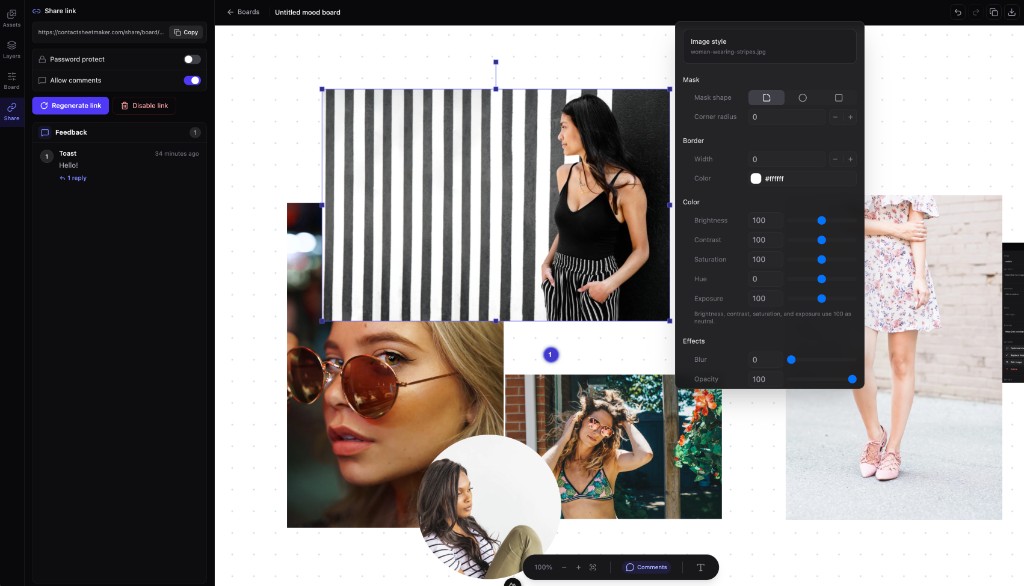
Arrange freely, crop, mask, tune colour, and add type without moving between tools.
Export a polished PNG or share a private review link for contextual client feedback.
Made for visual work
Align clients, crew, wardrobe, and location before shoot day.
Make colour, typography, texture, and visual references tangible.
Present décor, floral, and spatial ideas as one coherent story.
Keep comments attached to the exact visual they refer to.
Scan the essentials, then explore the full set when you need more detail.
Move, resize, rotate, and layer every element freely. Use snap-to-grid when precision matters, or keep the composition loose while ideas are still forming.
Combine images, playable video, PDF pages, and styled text on the same board so the whole creative brief lives in one visual space.
Apply masks, borders, corner radius, opacity, and colour adjustments directly on the canvas instead of preparing every asset elsewhere.
Export a high-resolution PNG for decks and handoffs, with zoom and fit controls for presenting the board live.
Ultimate adds browser-based share links with optional password protection. Clients can view the work without creating an account.
Ultimate also adds pinned canvas comments and threaded replies, keeping decisions beside the visual instead of buried in email.
Choose by workflow
Pro
Everything an individual creative needs to build and deliver a polished board.
Ultimate
Everything in Pro, plus a professional client review loop.
Compare contact sheets, mood boards, storage, and client proofing in one place.
Questions, answered
It is a browser-based canvas for arranging images, text, video, and documents into a visual direction. ContactSheetMaker gives you freeform control rather than locking your ideas into a collage template.
Pro includes unlimited mood boards, canvas editing, mixed-media layers, image styling, storage, and PNG export. Ultimate includes everything in Pro plus client share links, password protection, and canvas comments.
Yes. Ultimate share links open in a modern browser without requiring a client account. You can also password-protect unreleased work.
You can add common image formats, video files, PDF pages, and styled text layers, then arrange and edit them together on the canvas.
A contact sheet uses a structured photo grid for review and selection. A mood board is a freeform composition for visual direction, inspiration, and presentation.
Create your next contact sheet
Set the grid, add the details you need, and download a PDF from the browser.
Create and preview for free. A paid plan is required to download.
Arrange images, spacing, captions, and page details.
Export a contact sheet that is ready to send or print.
Ultimate adds share links, client selections, notes, and response emails.