A contact sheet is a page of labelled photo thumbnails arranged in a grid. In a darkroom it was made by laying negatives on photographic paper and exposing them in contact. Digitally, the purpose is the same: see every frame from a shoot in order, compare them, and record which ones move forward.
Where the contact sheet came from
Before scanners and screens, photographers needed a quick way to see what was on a roll without printing every frame. The answer was the contact print. Negatives were cut into strips, laid emulsion side down on a sheet of photographic paper, held flat under glass, and exposed under the enlarger. Because nothing was enlarged, each image came out exactly the size of the negative.
A roll of 35mm film was usually cut into six strips of six frames, so the whole roll fitted on one sheet of 8 × 10 inch paper. Medium format rolls produced fewer, larger frames: twelve square 6 × 6 negatives, for example, laid out in strips of three or four.
Photographers and picture editors then studied the sheet with a loupe and marked it up with a grease pencil. A circle or cross meant “print this one”. Those marked sheets are why contact sheets are still admired today: they show the frames either side of a famous photograph and the choices that led to it.
What a digital contact sheet includes
A useful sheet is more than a collage. Each thumbnail should keep enough detail to judge focus, expression, and composition, and each frame should carry a stable identifier. That identifier is usually the filename, a sequence number, or both. Add a short project name on the page so the document still makes sense months later.
- One ordered set, not a mixed folder of several jobs.
- A readable grid rather than the highest possible thumbnail count.
- Visible filenames for selects, retouching notes, and archives.
- A PDF or print that anyone can open without photography software.
What does a contact sheet look like?
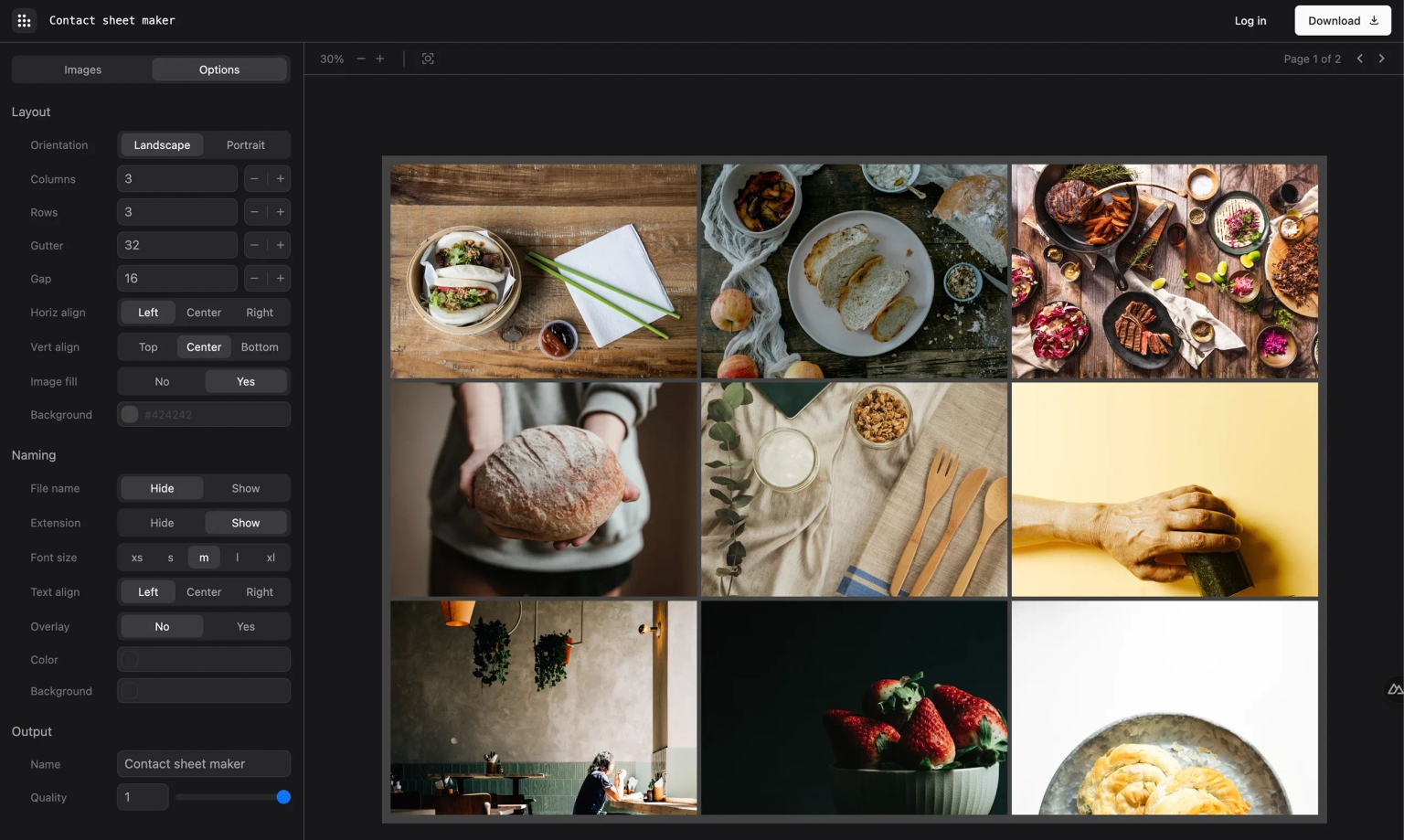
Picture a single page divided into equal cells, each holding one frame in the order it was taken. A short caption sits under each image, usually the filename. The page might carry the client, shoot date, or project name at the top, and sometimes a light watermark. A film sheet has the black borders and edge numbers of the negative strips; a digital sheet is cleaner, but the grid, the order, and the labels are the same idea.
The layout changes with the job. A portrait sheet uses a few large cells so faces can be compared. A wedding overview packs more frames onto each page. The contact sheet templates guide shows nine common layouts with the column and row counts for each.
Why photographers still make them
Catalog software already shows a grid. The contact sheet becomes useful when the review leaves that catalog. Clients, editors, agents, and production teams need a document they can open, print, attach to a brief, or mark up in a meeting. The sheet is a snapshot of what was offered at a particular stage, not a replacement for the originals.
Who uses contact sheets today
- Wedding and event photographers send an overview of the day so couples can choose images for albums and prints. See wedding contact sheets with watermarks .
- Portrait and headshot photographers use large cells so clients can compare expressions. See portrait and headshot contact sheets .
- Model agencies and casting teams share sheets of digitals, showing the same poses for every model, so clients can compare people quickly.
- Product and ecommerce teams pick hero angles and detail shots per SKU. See product photography contact sheets .
- Real estate photographers give agents and sellers one ordered view of a listing. See real estate contact sheets .
- Film photographers and archivists keep a printed index of every scanned roll, filed alongside the negatives.
Contact sheet, proof sheet, and gallery
These terms overlap, but they describe different jobs. A contact sheet is a compact overview of the take. A proof sheet is usually a client-facing set of larger previews used to choose finals. A gallery or proofing link is better when reviewers need to mark individual images and leave notes. Start with the overview; move to proofing only if the conversation needs it. The format comparison covers that choice in more detail.
How to read and mark up a contact sheet
Scan the whole sheet once before judging single frames. Look for the runs where the light, pose, or expression came together, then compare the frames inside each run. Reject the obvious misses first: closed eyes, missed focus, and frames where something intrudes at the edge. What remains is the real choice.
When you send a sheet to a client, tell them how to reply. A list of filenames is far more reliable than “the third one on page two”. The guide to writing photo selection instructions has wording you can reuse.
How to make one
Export review-sized copies, keep the shoot order, and open the contact sheet editor. Add the set, choose a column count that leaves expressions readable, keep filenames visible, and download a PDF. You can create and preview a sheet without an account; downloading a PDF requires a paid plan.
If you prefer desktop software, you can also build a sheet in Photoshop with Contact Sheet II , in Lightroom Classic’s Print module , or with the print tools built into macOS and Windows. Every method is covered in how to make a contact sheet . Planning to print it? Read how to print a contact sheet first.
Frequently asked questions
Why is it called a contact sheet?
In the darkroom, strips of negatives were pressed flat against photographic paper under glass and exposed to light. Because the negatives were in direct contact with the paper, the print was called a contact print, and the page of frames became a contact sheet.
Is a contact sheet the same as a proof sheet?
The terms are often used interchangeably. Strictly, a contact sheet is a compact overview of everything from a roll or shoot, while a proof sheet is a client-facing set of larger previews used to choose final images.
How many photos are on a contact sheet?
A traditional 35mm contact sheet shows a full roll of 36 frames on one sheet of paper. Digital sheets have no fixed number: 12 to 20 frames per page suits most client reviews, while archive index sheets may fit 48 or more.
What size is a contact sheet?
Film contact sheets were usually printed on 8 × 10 inch paper, with each frame the same size as the negative. Digital contact sheets are normally A4 or US Letter so they can be opened as a PDF or printed at home.
Do photographers still use contact sheets?
Yes. Wedding, portrait, product, real estate, and editorial photographers use digital contact sheets to show a client the full set, collect selections by filename, and keep a record of what was offered.